1. Find Gaps
Run a guided check using Drag-and-Drop, Paste OpenAPI YAML/JSON, 1-Click Guided Demos, or Examples (64) and explore the 4-tab view filter, plain-English Autonomy labels, and token savings.
Check your first APIStart here · Arcverin Studio & Runtime
Install Arcverin Personal Edition on Windows x64 or Ubuntu 26.04 x64 and activate with your license ($99 1-Month Pass or $49/mo billed annually · $588/yr). Launch Studio locally with no cloud login, check your first API, and serve verified MCP tools in minutes.
Personal Edition includes 1 individual user, 3 API projects, and 2 deployed MCP servers on your local workstation. Active Personal holders can unlock Team Edition ($149/mo billed annually · $1,788/yr) or request an Enterprise quote for Linux Docker and Kubernetes with PostgreSQL 15–18 at arcverin.com/upgrade/.
Choose your operating system below — your OS selection is remembered across every CLI example in the documentation. Every download authenticates against your active license and verifies both the detached Ed25519 signature and SHA-256 checksum locally.
Customer Downloads Portal · See Plans ($99 / $588) · Retrieve License ID
Option A — One-line PowerShell installer (auto-installs your license into output\license.arcverin):
# Run from your user folder (avoid C:\Windows\System32)
$env:ARCVERIN_LICENSE_KEY = "<your ARCVERIN-... activation key>"
irm https://www.arcverin.com/install-arcverin.ps1 | iex
Or download install-arcverin.ps1 and pass your downloaded license.arcverin file:
.\install-arcverin.ps1 -LicenseFile "$HOME\Downloads\license.arcverin" -InstallDir "$HOME\arcverin" -StartOption B — Direct ZIP download from the Customer Downloads Portal (also recommended on machines with PowerShell Constrained Language Mode where Add-Type is blocked by corporate policy):
# Extract the ZIP, enter the extracted folder, activate using the path to your downloaded license.arcverin, then start Studio
Expand-Archive .\arcverin-personal-*-windows-x64.zip -DestinationPath .\arcverin
cd .\arcverin\arcverin-verified-work-platform-*
.\arcverin.exe upgrade --license "$HOME\Downloads\license.arcverin"
.\start-arcverin.cmd
start-arcverin.cmd polls http://127.0.0.1:3002/healthz and opens Studio in your browser automatically.
Option A — One-line shell installer (verifies Ed25519 + SHA-256 and writes output/license.arcverin with 0600 permissions):
export ARCVERIN_LICENSE_KEY="<your ARCVERIN-... activation key>"
curl -fsSL https://www.arcverin.com/install-arcverin.sh | sh
Or download install-arcverin.sh and pass your downloaded license.arcverin file:
sh ./install-arcverin.sh --license-file ~/Downloads/license.arcverin --install-dir ~/arcverin --startOption B — Direct .tar.gz download from the Customer Downloads Portal:
tar -xzf arcverin-personal-*-linux-x64.tar.gz
cd arcverin-verified-work-platform-*
./arcverin upgrade --license ~/Downloads/license.arcverin
./arcverin-studio serve
Headless Linux / SSH / WSL note: On Linux, --start and ./arcverin-studio serve run Studio in the foreground bound to http://127.0.0.1:3002 (press Ctrl+C to stop). On a remote VM, forward port 3002 over SSH (ssh -L 3002:127.0.0.1:3002 user@host); in WSL2, open http://127.0.0.1:3002 directly from your Windows browser.
| Downloadable Archive | Size | Contents & Best Use |
|---|---|---|
inventory.zip | 9.4 KB | Broken (openapi-needs-repair.json) + clean (openapi.json) specs & Arazzo workflow for your first 5-minute scan. |
reference-benchmarks.zip | 49.2 KB | All 5 vendor-neutral synthetic OpenAPI 3.1 benchmark specs to reproduce published o200k_base token counts locally. |
arcverin-5-lane-starter-kit.zip | 7.6 KB | Ready-to-paste Claude/Cursor MCP configs, GitHub/GitLab CI gates, Docker Compose, and Helm secret bootstrap templates. |
Studio and the CLI follow one five-stage pipeline—1. Find Gaps › 2. Fix Contract › 3. Prove Safety › 4. Ship › 5. Operate—with top-bar access to the Guided / Workbench switch, Rules (102 built-in checks + Enterprise Visual JDM rules), and Examples (64):
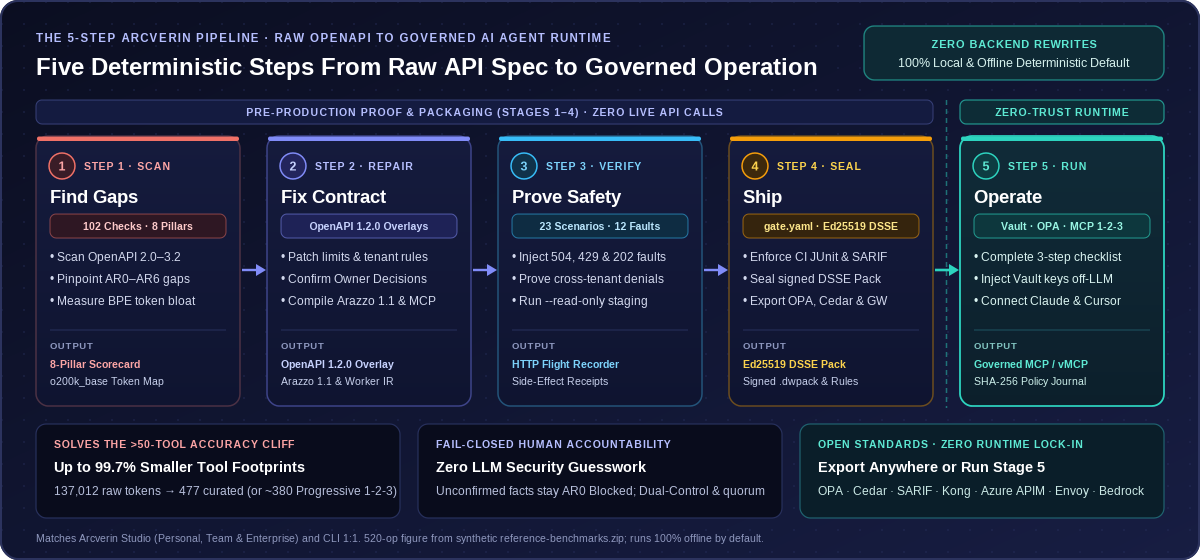
vMCP) profile.gate.yaml, seal a signed Evidence Pack, and promote directly into 5. Operate.Preserve your existing projects, output/, and var/ state by stopping running services and using the bundled updater (or passing --license to activate a renewed license):
.\arcverin-update.exe --root <your-arcverin-folder> install --stopped
.\arcverin.exe status
.\arcverin.exe upgrade --license .\license.arcverin
./arcverin-update --root <your-arcverin-folder> install --stopped
./arcverin status
./arcverin upgrade --license ./license.arcverinYou can also supply an inline activation key via ARCVERIN_LICENSE_KEY (ARCVERIN-<EDITION>-<base64>).
Run a guided check using Drag-and-Drop, Paste OpenAPI YAML/JSON, 1-Click Guided Demos, or Examples (64) and explore the 4-tab view filter, plain-English Autonomy labels, and token savings.
Check your first APIApply OpenAPI 1.2.0 Overlays, confirm Owner Decisions, inspect the top-bar Rules pill, compile an Arazzo 1.1 workflow or vMCP profile, and run 12-mode fault injection.
Use Quick Ship, seal DSSE Evidence Packs, complete Stage 5's 3-Step Readiness Checklist, publish to Claude Desktop / Cursor / VS Code, or watch the 4-minute narrated tour.
Ship & runtime · Studio visual guideAutomate Arcverin from CI/CD, Backstage/Port, ServiceNow/Slack, or coding agents via OpenAPI 3.2.1, Arazzo 1.1, and Stateless MCP 2026-07-28 (arcverin control-plane mcp-stdio & /api/v2/mcp).